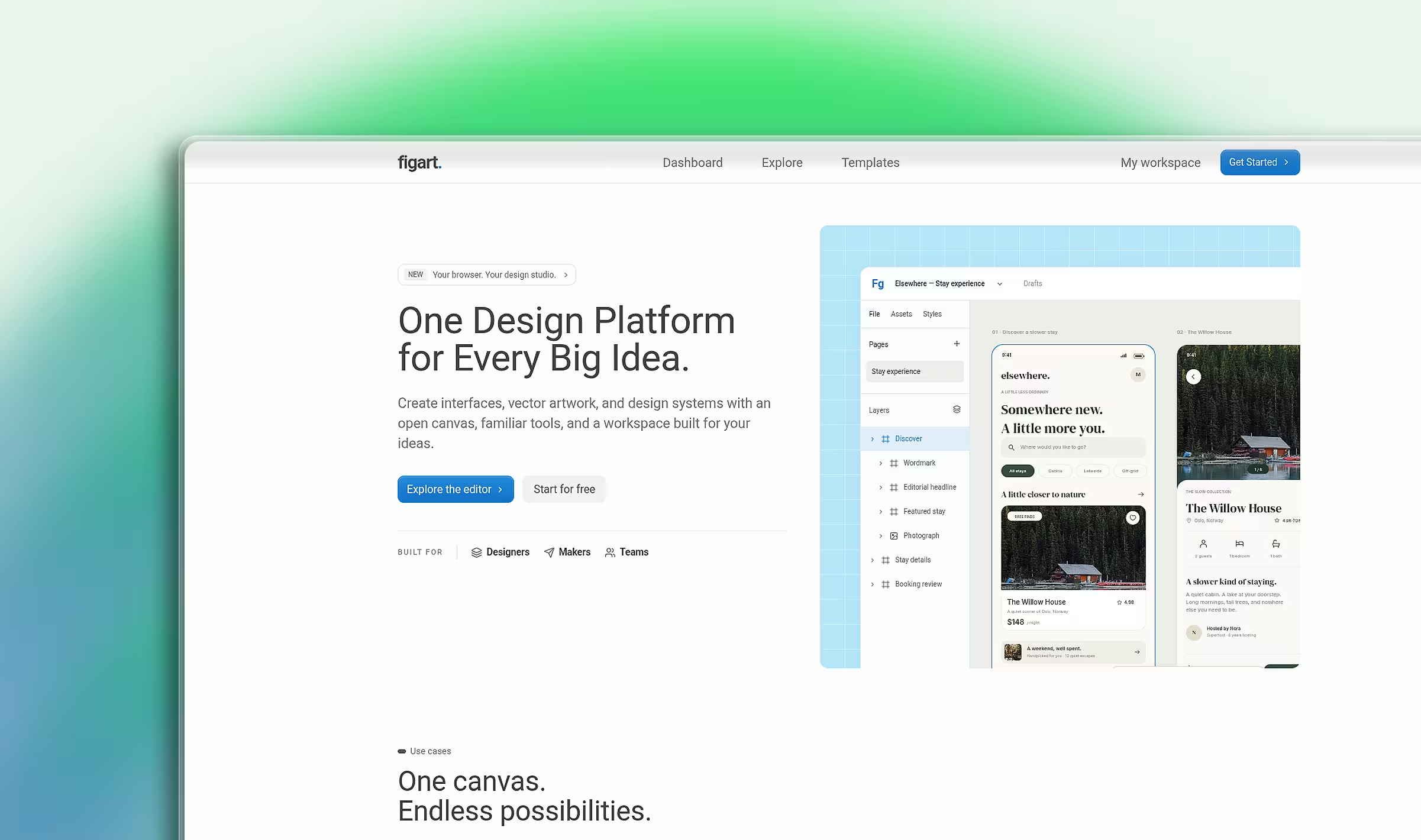
A browser design workspace for interfaces, vector artwork, and visual ideas. An SVG canvas, layers, properties, auto layout, and reusable design elements sit next to account-backed file storage and a GSAP-driven landing page; Next.js, React, Convex, Clerk, and Radix UI run the whole thing.
 Click to zoom
- Role
- Full-Stack Developer
- Timeline
- Ongoing
- Team
- Solo
- Status
- Live
Built with
- Next.js
- React
- TypeScript
- Convex
- GSAP
- Clerk
- Tailwind CSS
- Radix UI
- shadcn/ui
The brief
Interface design tools are heavy desktop software with a steep learning curve and a subscription attached. Figart puts a working canvas in the browser: draw vectors, arrange layers, reuse components, and keep files without installing an editor or creating an account first.
Built the SVG canvas and the document model behind it, the layers and properties panels, auto layout, local components and snapshot instances, undo/redo and clipboard behavior, SVG/PNG export with `.figart` JSON import, the Convex-backed account file storage with owner checks and revision guards, and the scroll-driven GSAP landing page.
Implementation notes
Draw with SVG, not a bitmap canvas
The document renders as SVG, so every shape stays an editable node with real geometry instead of a flattened bitmap. Exports stay lossless, and the same document powers the canvas, the landing preview, and the file a user downloads.
Local first, account second
A guest can draw, save to the browser, and export without signing in. An account adds Convex documents protected by an owner check and an expected revision, so an older tab cannot silently overwrite a newer file. Copying a public starter saves a browser copy before it tries to create an account document.
Treat a failed save as an error
The editor keeps a browser backup alongside the document. When a save fails the state stays an error and the recovery data is retained, so a user never loses an hour of drawing to a quiet success message.
One scrubbed timeline for the hero
GSAP ScrollTrigger drives a single timeline that contracts the landing scene into an editor preview card, with the headline and preview following the same scrub. Reduced-motion users get the same layout in normal flow, and the static version is the fallback when the animation module cannot load.
Keep the editor usable on a small screen
Below 1024px the layers and properties panels move into separate Radix drawers with focus trapping and Escape dismissal, so the canvas keeps the available space. Desktop panel visibility is stored separately and survives a resize.
Current result
A working design workspace used to draw interface concepts, with local and account-backed documents, an editable demo on the landing page, a file browser with search, favorites, trash, and restore, and a written list of the features that are not implemented yet.
What the workspace does
Figart is a design tool that runs in a browser tab. It opens on a landing page, but the product is the editor behind it: a canvas where a design is built from real objects instead of pasted images.
The canvas holds frames, rectangles, ellipses, lines, text, raster images, and Bézier paths. The layers panel holds pages, nested layers, grouping, ordering, visibility, locking, and renaming. The properties panel covers position, dimensions, rotation, fills, strokes, opacity, corner radii, shadows, typography, and alignment. Auto layout adds horizontal and vertical flow with gap and padding, so a row of cards can be rearranged without retyping every frame.
Local components store a design element once. An instance reuses that element as a snapshot, and can be detached when it needs to diverge from its source. Colour swatches keep a palette close to the canvas while working.
Beyond the canvas, the tool covers the parts of a design workflow that usually get skipped: undo and redo, clipboard operations, duplication, nudge, pan, zoom, grid snapping, prototype links and presentation, CSS property inspection, and export.
The editing workflow
Open /start to create a local design without signing in, or /editor/demo to explore the starter document. Signed-in users get /dashboard, a file browser with search, sorting, grid and list views, favourites, duplicate, rename, trash, restore, and permanent deletion.
The canvas responds to the keyboard as well as the mouse:
| Action | Control |
|---|---|
| Move, frame, rectangle, ellipse, text | V, F, R, O, T |
| Pen, hand | P, H |
| Temporary pan | Hold Space and drag |
| Pan / zoom | Scroll / Ctrl or Cmd + scroll |
| Fit page / fit selection / actual size | Shift+1 / Shift+2 / 0 |
| Duplicate while moving | Alt + drag |
| Constrain movement / cancel a drag | Shift + drag / Escape |
| Undo / redo | Ctrl or Cmd+Z / Ctrl or Cmd+Shift+Z |
| Group / ungroup | Ctrl or Cmd+G / Ctrl or Cmd+Shift+G |
| Toggle desktop sidebars / layers | Tab / Shift+Tab |
The pen places anchors: a click for a corner, a drag for Bézier handles, and a click on the first anchor to close a path. Enter or Escape ends the current pen operation, a double-click reopens a path for anchor editing, and Alt-drag splits handles.
Where the engineering sits
The document model lives in lib/design: hierarchy, layout, vector helpers, the frame queue, storage, file creation, and the starter document are separated from the components that render them. components/design/ holds the dashboard, editor, SVG canvas, toolbar, panels, responsive drawers, and dialogs.
One editing hook owns the canvas interaction, so the canvas stays a view over state instead of a place where state is written. Undo and redo history, clipboard behavior, and the transform rules live in that hook, which is why the same drag can be constrained with Shift, duplicated with Alt, and undone afterwards.
The site is split the same way. components/landing/ holds separate hero, features, starter, workflows, workspace, FAQ, and get-started sections; components/site/ and lib/site/ hold the marketing pages, article catalog, navigation, and canonical origin. Statically generated articles are defined in the site catalog rather than hand-written per route.
Saving, ownership, and recovery
Saving is the part with the most edge cases, so it carries the most rules. Account documents write to Convex with an owner check and an expected revision. The editor also keeps a browser backup, and a failed save stays an error with its recovery data intact rather than reporting a success that did not happen. A stale tab cannot overwrite a newer revision.
Local files and the demo live only in the current browser. The app says so, and offers a downloadable editable backup before browser data is cleared or the user switches devices. Browser recovery files can be copied into an account from the dashboard.
Documents export as SVG and PNG, and the editable .figart JSON format keeps a design portable between the editor and version control. Older .repimly files stay importable after the rename, so files created in the previous version of the app still open. The internal document identifier, storage key, and storage event are kept for the same reason.
The landing page
The hero starts as a full-width design scene and contracts into a rounded editor preview card as the page scrolls. hero-section.tsx renders the copy and artwork on the server, while scroll-hero.tsx loads GSAP and ScrollTrigger on the client. One scrubbed timeline drives the scene, the headline, and the preview, and CSS sticky positioning supplies the scroll stage instead of pinning the rest of the page.
The preview uses the same editable Elsewhere document as the demo, so the marketing page and the product share one file. On narrow screens the transition distance shortens. Reduced-motion preferences show the intro and preview in normal flow, and that static layout is also the fallback if the animation module fails to load — navigation stays available either way. The homepage navbar stays hidden over the opening scene and appears when the card finishes forming, sliding down with a brief initial blur.
A single-row "Powered by" marquee follows the animated card, identifying the stack rather than customers. Original SVG wordmarks are stored locally with source credits, the animation pauses off-screen and on hover, and reduced motion shows a static grid instead.
Validation
The repository runs npm run typecheck, npm run test:design, and npm run build, with targeted ESLint checks on changed TypeScript files. The Node test runner loads .ts files directly, so the document invariants, persistence behavior, editor interactions, and site routes are tested without a separate transpiler. The interface is checked at phone, tablet, and desktop widths, including drawer dismissal, canvas controls, file operations, and save recovery.
What is not built yet
Boolean geometry, advanced constraints, variants, bound variables, live collaboration, comments, plugins, advanced prototype transitions, and native .fig import are not implemented. Instances are snapshots, so a later change to the source component does not propagate to every instance. Selection bounds and alignment use axis-aligned geometry, and while touch layouts are supported, a mouse or trackpad remains more useful for precise vector editing.
Figart adapts interface ideas and workflows from FigCraft into React and TypeScript rather than running its Rust/egui runtime, and the repository keeps those attributions and the demo asset credits in licenses/.
"You have a right to perform your prescribed duty, but you are not entitled to the fruits of actions."
Design by SahilCodex
© 2026. Built with hands.